Robot Status in Flows
A Flow can read the robot's status, wait for it to change, and contribute to it, using the nodes in the robot-status group of the standard node library. This page assumes you're familiar with the robot's health and readiness, and what the status indicator shows; see Robot Status for an introduction.
A Flow is one of several contributors to the robot's status, alongside Agent components and status rules in the robot's configuration. The robot reports the most severe value from any contributor: for health, 🔴 Critical outranks 🟡 Abnormal, which outranks 🟢 Normal; for readiness, 🔵 Busy outranks 🟢 Idle. See How the status is set.
The robot-status Flow nodes require a version of the Agent that supports them. On older Agents, these nodes fail when run.
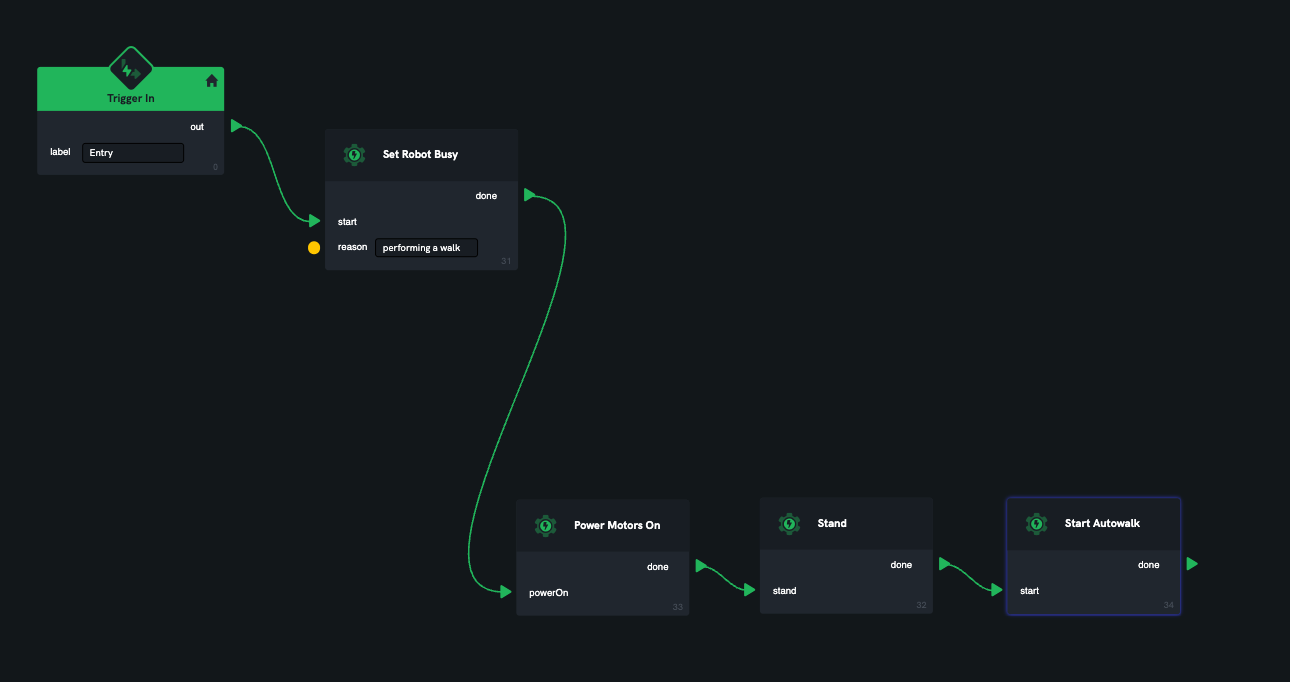
The most common use is to mark the robot 🔵 Busy for the duration of a mission: put a Set Robot Busy node at the start of the mission Flow. The robot stays 🔵 Busy until the Flow ends, then the Flow's contribution is withdrawn automatically. This happens however the Flow ends — whether it completes, fails or is stopped — so a robot can't be left marked 🔵 Busy by a Flow that is no longer running.
Setting status
| Node | Effect |
|---|---|
| Set Robot Busy | Contributes 🔵 Busy readiness. |
| Set Robot Idle | Contributes 🟢 Idle readiness. |
| Clear Robot Readiness | Withdraws this Flow's readiness contribution. |
| Set Robot Healthy | Contributes 🟢 Normal health. |
| Set Robot Abnormal | Contributes 🟡 Abnormal health. |
| Set Robot Critical | Contributes 🔴 Critical health. |
| Clear Robot Health | Withdraws this Flow's health contribution. |
The Set nodes take an optional reason, which is shown in the indicator's tooltip and on the Status card. A good reason tells an operator what the robot is doing or what's wrong, such as "running inspection mission" or "payload not detected".
Each Flow has one health contribution and one readiness contribution. Setting a value again replaces the Flow's previous value rather than adding another, and the reason is updated with it. On the Status card, a Flow's contribution is listed with a source of the form flow:<flow id>/<instance id>.
Because the most severe contribution wins, Set Robot Idle and Set Robot Healthy can't override another contributor. If something else is reporting 🔵 Busy, the robot stays 🔵 Busy after a Flow sets 🟢 Idle. To undo what your Flow set, use Clear Robot Readiness or Clear Robot Health.
If a Flow restarts, its contributions from the previous run are withdrawn, and the new run needs to set them again.
Reading status
| Node | Effect |
|---|---|
| Get Robot Status | Reads the robot's current status once. |
| On Robot Status Change | After start, fires onChange each time the robot's status changes, until stop. |
Both nodes output the robot's status: health and readiness as their numeric values (see the robot/status topic), plus the convenience flags isIdle, isBusy, isHealthy and isUnhealthy. isUnhealthy is true when health is 🟡 Abnormal or 🔴 Critical.
Waiting for a status
| Node | Continues when the robot is… |
|---|---|
| Wait until Robot Idle | 🟢 Idle. |
| Wait until Robot Busy | 🔵 Busy. |
| Wait until Robot Healthy | 🟢 Normal health. |
| Wait until Robot Unhealthy | 🟡 Abnormal or 🔴 Critical health. |
Each wait node continues from done as soon as the robot is in the awaited state, which may be immediately. Each takes a timeout in seconds; if the robot hasn't reached the state by then, the node continues from timeout instead. A timeout of zero waits indefinitely.
An 🟢⚪ Unknown value doesn't satisfy any of the wait nodes. A robot whose readiness is 🟢⚪ Unknown is neither idle nor busy, and one whose health is 🟢⚪ Unknown is neither healthy nor unhealthy. On a robot that reports its status, 🟢⚪ Unknown usually means something has stopped reporting, so it isn't safe to treat it as either.
A Flow's own contribution counts towards the robot's status. If a Flow has marked the robot 🔵 Busy, a Wait until Robot Idle later in the same Flow will never finish (or will always time out), because the Flow is itself keeping the robot 🔵 Busy. Use Clear Robot Readiness before waiting for the robot to become idle.