Dynamic Multi Select Widget
Widget Type: rc-dynamic-multi-select
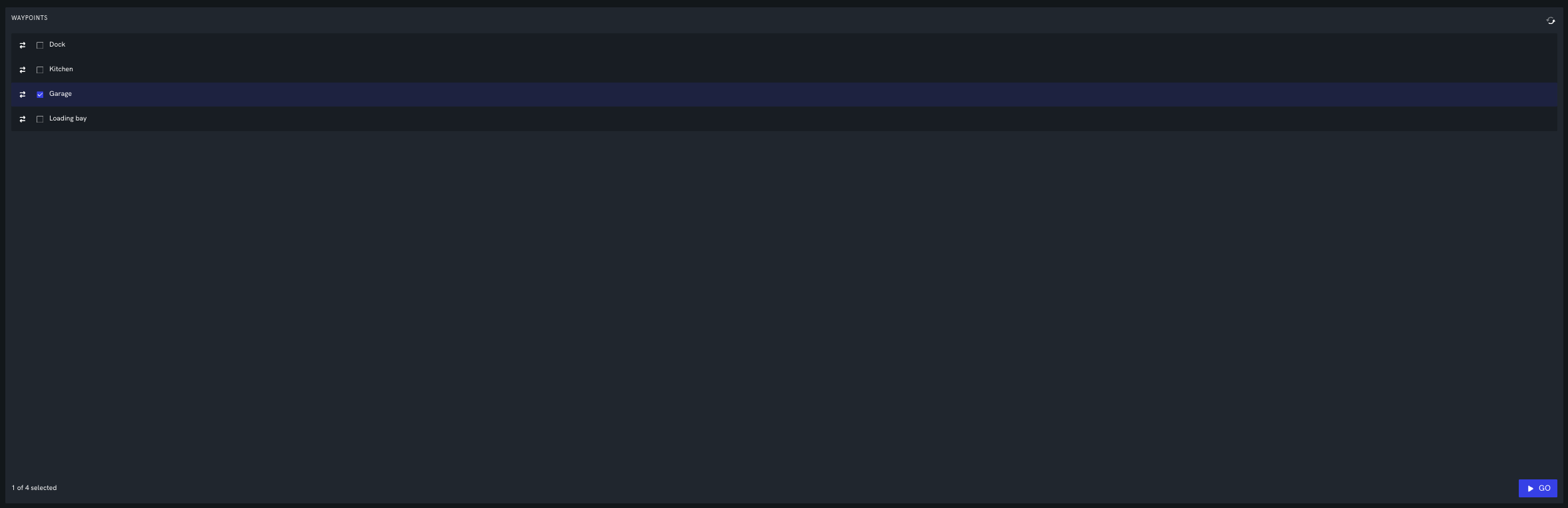
Displays a list of items — populated live from a robot source, baked into the config, or both — that the operator can select and drag to reorder. The selected items, in their chosen order, are passed to the actions run by the buttons at the bottom of the widget. For example, a robot can publish the waypoints it knows about; the operator selects a few, drags them into the desired order, and clicks a "Go" button to send them to a navigation service.
Configuration
title (optional) Heading shown at the top of the widget.
emptyMessage (optional) Message shown when the list has no items.
timeoutMs (optional) For a service source, how long to wait for a response (milliseconds, default 5000). For a telemetry source, how long before the stale-data frame is shown.
params (optional) Key/value pairs made available to the button actions as ctx.params (for example, a dashboard variable that should be included in the request).
options (optional) An array of items (see Items) baked into the config. The displayed list is the union of options and the items returned by source, deduped by id (an option wins if it shares an id with a sourced item). Provide options on its own for a fixed list, or alongside source to add fixed rows (such as a pinned header or footer) among the dynamic ones.
Source
Where the list is populated from. Omit source to drive the list entirely from options.
sourceType telemetry or service. A telemetry source updates the list live as new telemetry arrives; a service source is fetched once and can be re-fetched with the refresh button that appears in the widget header.
source The telemetry topic or service URI. For telemetry topics, include an interval (e.g. ?int=1s).
expression A string containing a javascript function where the argument is the source output and which returns the list of items — either an array of { id, label } objects or an array of strings (each string is used as both id and label).
payload (optional, service only) The request payload to send with the service call.
rawPayload (optional, service only) When true, the payload string is sent to the service verbatim instead of being JSON-encoded again. Use this when payload is already the exact JSON body you want on the wire.
{
  "source": {
    "sourceType": "telemetry",
    "source": "/waypoints/known?int=1s",
    "expression": "(msg) => msg.payload.waypoints"
  }
}
Items
Each item — whether returned by the source expression or listed in options — is an object:
id Unique identifier for the item, used to track its selection and order.
label Text shown for the item.
subLabel (optional) Secondary text shown beneath the label.
description (optional) Tooltip shown when hovering over the item.
icon (optional) Icon shown next to the item, any of the icons defined by the icon component.
index (optional) Pins the item to a fixed position: it cannot be dragged and always appears at this index. The value is clamped, so 0 keeps it at the top and a large value such as 999999 keeps it at the bottom. Items without an index are freely reorderable and fill the positions in between. Useful for a fixed header or footer item.
forceSelected (optional) When true, the item is always selected and its checkbox is locked on, so it is always included in the actions' context. Typically paired with index for a header or footer that must always be part of the payload.
Buttons
An array of buttons shown along the bottom of the widget. Each button runs a sequence of actions, into which the current selection is injected.
id Unique identifier for the button.
label Button text.
icon (optional) Icon shown on the button.
buttonType (optional) Appearance, one of primary, panic, default, outlined, yellow, grey.
requireSelection (optional) When true (the default), the button is disabled until at least one item is selected. Set to false for a button that should always be enabled (for example a "Stop" button).
actions The sequence of actions to run when the button is clicked — each a service call (kind: "service") or a control message (kind: "message"). Any string field can be a literal or a javascript expression (ctx) => ... evaluated against the selection context.
The context (ctx) available to the action expressions contains:
selected The selected items (full objects) in their current display order.
selectedIds The ids of the selected items, in display order.
items All items currently in the list, in display order.
params The params object from the config.
{
  "actions": [
    {
      "kind": "service",
      "source": "/nav/visit",
      "payload": "(ctx) => ({ waypoints: ctx.selectedIds })"
    }
  ]
}
Example
This widget populates the list live from a telemetry topic and, when "Go" is clicked, sends the selected waypoints (in the operator's chosen order) to a navigation service. The "Stop" button is always enabled.
{
  "config": {
    "title": "Waypoints",
    "source": {
      "sourceType": "telemetry",
      "source": "/waypoints/known?int=1s",
      "expression": "(msg) => msg.payload.waypoints"
    },
    "buttons": [
      {
        "id": "go",
        "label": "Go",
        "icon": "play",
        "buttonType": "primary",
        "actions": [
          {
            "kind": "service",
            "source": "/nav/visit",
            "payload": "(ctx) => ({ waypoints: ctx.selectedIds })"
          }
        ]
      },
      {
        "id": "stop",
        "label": "Stop",
        "icon": "estop",
        "buttonType": "panic",
        "requireSelection": false,
        "actions": [{ "kind": "service", "source": "/nav/stop" }]
      }
    ]
  }
}
Fixed start and end, dynamic middle
A pinned "Start at dock" and "Return to dock" are baked in through options — always present, always selected — around the live waypoints, which the operator selects and reorders in between.
{
  "config": {
    "title": "Route",
    "source": {
      "sourceType": "telemetry",
      "source": "/waypoints/known?int=1s",
      "expression": "(msg) => msg.payload.waypoints"
    },
    "options": [
      { "id": "start", "label": "Start at dock", "icon": "home", "index": 0, "forceSelected": true },
      { "id": "end", "label": "Return to dock", "icon": "home", "index": 999999, "forceSelected": true }
    ],
    "buttons": [
      {
        "id": "go",
        "label": "Go",
        "icon": "play",
        "buttonType": "primary",
        "actions": [
          {
            "kind": "service",
            "source": "/nav/visit",
            "payload": "(ctx) => ({ waypoints: ctx.selectedIds })"
          }
        ]
      }
    ]
  }
}
Populated from a service call
When the list comes from a one-shot service rather than telemetry, a refresh button appears in the header to re-fetch it.
{
  "config": {
    "title": "Waypoints",
    "source": {
      "sourceType": "service",
      "source": "/nav/listWaypoints",
      "payload": "{}",
      "expression": "(res) => res.waypoints"
    },
    "buttons": [
      {
        "id": "go",
        "label": "Go",
        "buttonType": "primary",
        "actions": [
          {
            "kind": "service",
            "source": "/nav/visit",
            "payload": "(ctx) => ({ waypoints: ctx.selectedIds })"
          }
        ]
      }
    ]
  }
}