Gamepad Controller Widget
Widget Type: rc-gamepad-controller
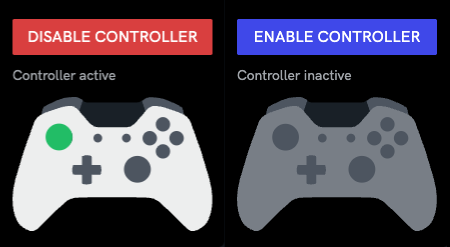
Sends Commands V2 to the robot from a physical game controller, using the same gamepad configuration authored in the console under the robot definition's Gamepads tab. That configuration — mappings, deadzones, expo curves, actions and variables — is the single source of truth and drives the console's native gamepad control in exactly the same way, so a configuration you've already tuned there behaves the same under this widget.
Configuration
Add it to a dashboard with no config block and it works out of the box:
{}
The dashboard config only selects how the browser reads the controller — mappings, actions and variables are never set here; they always come from the robot's gamepad configuration in the console.
Event-driven input
Some Chromium based browsers, such as Google Chrome and Microsoft Edge browsers, support an experimental, faster way of reading a controller: instead of the widget polling for input, the browser can push an event the instant it receives a new reading. This is opt-in and off by default, since the browser feature it depends on is still experimental and not available everywhere.
{
  "inputMode": "auto"
}
polling(default) — reads the controller on every screen refresh (~60 times a second). This is the original behaviour and works everywhere.raw-events— asks for the faster, event-driven reading by name. If the operator's browser doesn't support it, the widget falls back to polling automatically and says so in the panel — it never stops working, it's just not as fast as requested.auto— uses the faster reading where the browser supports it, and polls silently everywhere else.
As of writing, this is only available in Chrome on Windows, with an experimental flag turned on
(chrome://flags/#gamepad-raw-input-change-event), or for browsers enrolled in Chrome's origin
trial for the feature. Treat it as a latency improvement for browsers that support it — never rely
on it being available, since polling mode remains fully supported everywhere and is the safe
default.
Behaviour
The widget reads the controller continuously and sends the bound Commands V2 command without waiting for an acknowledgement. How often a command is actually sent depends on the action's own configured frequency, not on how often the controller is read — reading is always fast, sending follows the configuration.
onceactions fire on the rising edge of a press.continuouslyactions act as a heartbeat: they send at the action's configured frequency for as long as the controller is armed, whether or not the stick is deflected. They also send immediately the moment an input returns to zero, so a stop is never delayed.- Every command carries a
gamepadSendTimeMsparameter.
This heartbeat lets the robot treat a gap in commands as a stop. Nothing is sent while the controller is disarmed, while no controller is connected, or while the browser tab is hidden — the command stream simply stops in each case, and a robot with a command timeout halts on its own. Disarming also sends one zeroed stop command up front, so the robot doesn't have to wait out its timeout.
Stick deadzones are radial rather than per-axis — the deadzone applies to the stick's overall deflection, so it feels the same in every direction, including diagonals.
Modifier buttons
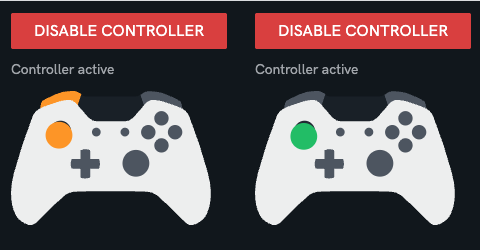
An action can be configured to only apply while one or more other inputs are held down
(modifiers, authored in the console alongside the rest of the gamepad configuration). This lets
one controller carry more than one layer of bindings — for example, a trigger held down could
switch the sticks from driving to arm control.
- An action with no modifiers configured always applies, regardless of what else is held.
- If an input has both a base binding and a modified binding, holding the modifier switches cleanly to the modified one.
- An input that only has a base binding keeps working normally even while a modifier is held elsewhere.
- An input whose only binding requires a modifier does nothing until that modifier is held — it never falls back to some other behaviour.
Leaving a modified layer (releasing the modifier) immediately sends one stop command for any continuous action that was running under that layer, so the robot doesn't keep driving on a stranded command until its own timeout.
On the controller graphic, anything firing a modified binding — the modifier itself, plus any stick or button pressed alongside it — lights up orange instead of the usual green, so it's always clear when a modifier layer is active.
Disarming
Arming is a manual toggle, but the widget also disarms itself automatically:
| Trigger | When |
|---|---|
| Idle | No controller input for 5 minutes |
| Lost focus | The dashboard panel loses focus, immediately |
| Disconnect | The controller is unplugged or loses connection |
| Unmount | The widget is removed from the dashboard |
Losing focus is the one resumable disarm: the robot stops the instant focus is lost, and if focus returns within 30 seconds the controller re-arms automatically — so glancing at a video feed mid-drive doesn't require a manual re-arm. Every other trigger, and a resume window that has closed, requires the operator to arm it again manually.
Every disarm sends a zeroed stop command first, and the panel always shows which trigger caused it, so a robot that's gone quiet doesn't read as a fault.
Differences from the console's native gamepad control
This widget does not behave identically to the console's built-in gamepad control — it improves on a few things, so a configuration tuned against one may feel different under the other:
| Native gamepad control | This widget | |
|---|---|---|
| Stopping | One zeroed command, sent once | Continuous heartbeat, plus an immediate stop |
| Stick deadzone | Per axis (square dead area) | Radial (circular dead area) |
| Input read rate | 10Hz | ~60Hz, or event-driven under raw-events |
| Modifier resolution | Subset and specificity | Subset and specificity (same rule) |
Don't drive the same robot from both at once — neither coordinates with the other, and the behavioural differences above make doing so more confusing, not less.