Input Button Widget
Widget Type: rc-input-button
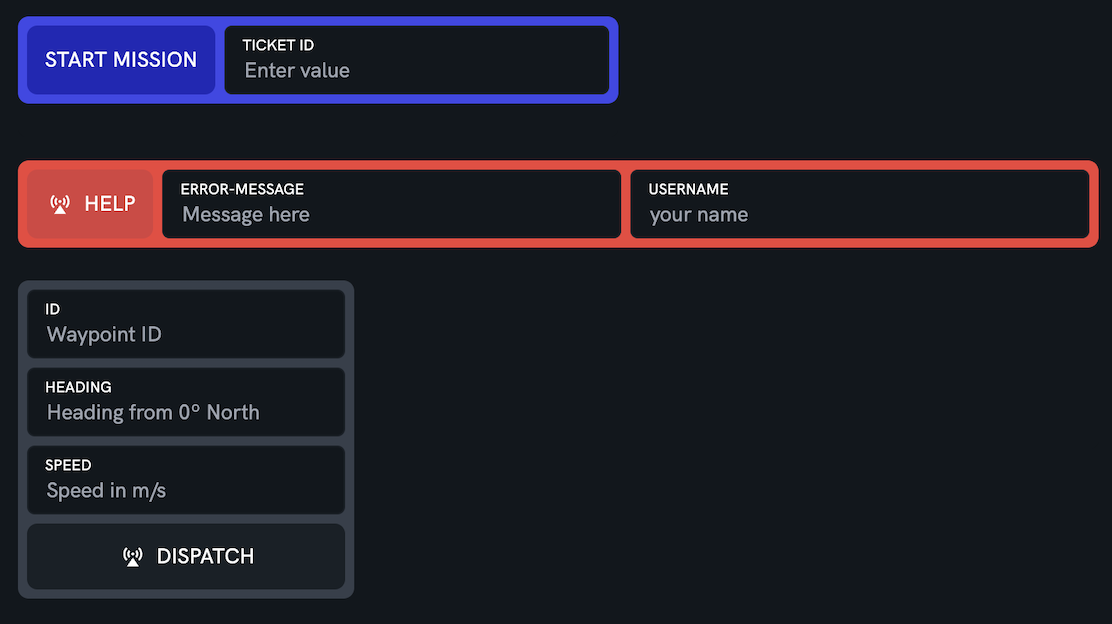
A button paired with one or more labelled inputs (free text or dropdown). When pressed, the widget gathers the current input values and dispatches them to the robot — either by running a sequence of robot actions (actions, preferred) or by calling a single service (service, deprecated).
Configuration
actions Array of robot actions to run in order when the button is pressed. See Actions below.
service (deprecated — use actions) Service path to call when the button is pressed. The request payload is the merge of payload (if set) and the input values, keyed by each input's payloadKey. Ignored when actions is set.
One of actions or service must be configured; use actions for new configurations.
label (optional) Button label. Defaults to Submit.
icon (optional) Icon to show on the button. Any icon name supported by the widget icon component.
buttonType (optional) primary, panic, default, outlined, yellow, or grey. Defaults to primary.
layout (optional) horizontal (default) or vertical. Controls whether the button sits beside or above/below the inputs.
buttonPosition (optional) Where to place the button relative to the inputs. In horizontal layout: left (default) or right. In vertical layout: bottom (default) or top.
inputs (optional) Array of input descriptors. If omitted or empty, only the button renders.
payload (deprecated — use actions) JSON-encoded string representing the base payload sent with the service call. Input values override matching keys. Not used by the actions path — each action carries its own payload.
timeoutMs (optional) Maximum time to wait for each call. Defaults to 5000 for the service path and 30000 per action for the actions path.
Input descriptor props
payloadKey Required. The key the input's value is sent under. A dot-separated path such as settings.arguments.task_id writes the value nested inside the payload.
kind (optional) text (default) or dropdown.
label (optional) Label shown above the input. Defaults to the last segment of payloadKey.
valueType (optional) string (default), number, boolean, or json. Coerces the entered text before it is sent, so values match the type the receiving service expects (e.g. numeric flow arguments).
placeholder (optional) Placeholder text. Defaults to Enter value for text inputs and Select… for dropdowns.
defaultValueExpression (optional) A stringified JavaScript function (queryParams) => value that produces the input's initial value from the dashboard URL query parameters. Arrays are joined with commas; use .join() in the expression to control the separator.
Dropdown-only props:
options Required for dropdowns. Array of { "label": string, "value": string } entries.
required (optional) When true, pressing the button is blocked (with an error toast and highlight) until a value is selected.
Actions
Each entry in actions runs in order; a failure stops the remaining actions unless that action sets allowFailure. String fields can be either a literal or a stringified kscript expression (ctx) => … — see Script Context for what ctx contains.
kind Required. service (call a robot service) or message (publish a control message).
source Required for service actions. Service path to call.
target Required for message actions. Destination topic.
payload (optional) The payload to send. Literal, or a kscript expression built from the input values, e.g. "(ctx) => ({ key: 'capture_status', value: ctx.status })".
meta (optional, message actions) Map of meta headers; each value may be a literal or kscript expression.
allowFailure (optional) When true, a failure of this action does not stop the rest of the sequence.
Script Context
Several string fields accept a stringified arrow function ("(ctx) => …") instead of a literal. Each function is called with a single argument; this table is the reference for what that argument contains in each case.
| Expression field | The function receives |
|---|---|
Input defaultValueExpression | The widget's params object, provided by the host under config.params. On a rocos-console dashboard this is the dashboard URL's query parameters (not overridable in the widget config). One entry per parameter: string, or string[] when the parameter is repeated. |
Action source, target, payload, and each meta value | The current input values: one property per input at its payloadKey (dot-separated keys appear nested), coerced per valueType. An input the operator left empty contributes "". Nothing else is injected — in particular URL params are not in this context; to feed a param into an action, prefill an input from it via defaultValueExpression. |
For example, with inputs { "kind": "dropdown", "payloadKey": "status" } and { "payloadKey": "settings.arguments.task_id", "valueType": "number" }, an action expression receives:
{
  "status": "door_closed",
  "settings": { "arguments": { "task_id": 1234 } }
}
so "(ctx) => ({ key: 'capture_status', value: ctx.status })" reads the dropdown selection.
Example
Note: the examples that configure service/payload show the deprecated form; prefer actions for new configurations.
{
  "service": "/robot/command",
  "label": "Send",
  "icon": "send",
  "buttonType": "primary",
  "inputs": [
    {
      "payloadKey": "target",
      "placeholder": "e.g. tank-A"
    },
    {
      "payloadKey": "reason",
      "placeholder": "Why are you dispatching?"
    }
  ],
  "timeoutMs": 5000
}
Example with actions and a dropdown
Writes the selected status to the flow-engine blackboard, then (best-effort) publishes a notification message built from the same inputs.
{
  "label": "Mark Capture",
  "buttonType": "primary",
  "layout": "vertical",
  "inputs": [
    {
      "kind": "dropdown",
      "payloadKey": "status",
      "label": "Capture Status",
      "required": true,
      "options": [
        { "label": "Success", "value": "success" },
        { "label": "Door Closed", "value": "door_closed" },
        { "label": "Blockage", "value": "blockage" }
      ]
    },
    {
      "payloadKey": "note",
      "label": "Note",
      "placeholder": "Optional note"
    }
  ],
  "actions": [
    {
      "kind": "service",
      "source": "/flow-engine/blackboard/set",
      "payload": "(ctx) => ({ key: 'capture_status', value: ctx.status })"
    },
    {
      "kind": "message",
      "target": "/robot/notify",
      "payload": "(ctx) => JSON.stringify({ status: ctx.status, note: ctx.note })",
      "allowFailure": true
    }
  ]
}
Example with nested payload keys and value coercion
Starts a flow whose manifest expects numeric arguments. Dotted payloadKeys write into settings.arguments, and valueType converts the typed text to numbers.
{
  "service": "/flow-engine/startFlow",
  "label": "Start Mission",
  "layout": "vertical",
  "payload": "{\"instance\":\"mission-flow\",\"id\":\"<flowId>\",\"settings\":{\"logLevel\":4,\"arguments\":{}}}",
  "inputs": [
    {
      "payloadKey": "settings.arguments.task_id",
      "label": "Task ID",
      "valueType": "number"
    },
    {
      "payloadKey": "settings.arguments.location_count",
      "label": "Locations",
      "valueType": "number"
    }
  ]
}
Example with default value from URL query parameter
When the dashboard URL has ?ticket-id=abc, the input is pre-filled with abc.
{
  "service": "/robot/command",
  "label": "Send",
  "inputs": [
    {
      "payloadKey": "id",
      "defaultValueExpression": "(q) => q['ticket-id']"
    }
  ]
}
Example with vertical layout and base payload
{
  "service": "/robot/dispatch",
  "label": "Dispatch",
  "layout": "vertical",
  "buttonPosition": "bottom",
  "payload": "{\"source\":\"dashboard\"}",
  "inputs": [
    {
      "payloadKey": "target",
      "placeholder": "e.g. tank-A"
    },
    {
      "payloadKey": "priority",
      "placeholder": "low / med / high"
    }
  ]
}